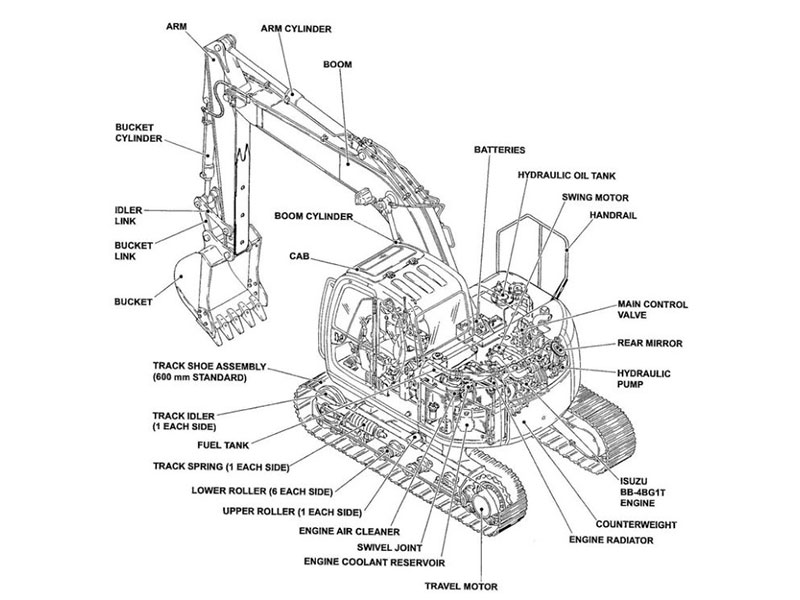


This guide makes it easier to read and use a Volvo excavator parts diagram. That way, you can find the right part and order it with confidence. You probably know the usual problems: a part arrives that does not fit, symbols look confusing, serial numbers do not match, and callouts point nowhere clear. Treat the catalog as a helpful guide, not a promise, and use these easy-to-read diagrams to check fitment before you buy.
Key Takeaways
Make sure you use the right parts catalog for your excavator’s model and serial number.
Match the callout numbers on the diagram to the rows in the parts list.
Check the serial applicability, equipment options and installed component before selecting a part.
Check the quantity and part number before you place your order.
Read supersession notes and verify the current replacement requirements.
Start with the Right Excavator Parts Catalog
A parts catalog helps you identify components. It does not promise fitment by itself. You need the correct excavator parts catalog for your machine. That catalog must match the model and serial number exactly. A catalog made for a different model can show similar-looking parts that will not fit. Always confirm model and serial applicability before you trust any page. The right parts catalog turns a confusing search into a short, clear task.
Match Catalog to Model and Serial Number
Record the complete machine model and product identification from its identification plate and records. Select a catalog whose stated coverage includes that machine. Find coverage details in the publication information and applicability notes; do not assume they are printed on every cover. Record engine or component identification separately where relevant.
Record the publication number and revision so the source can be checked. A revision date alone does not establish fitment. Use the stated serial coverage, options, component information and current replacement guidance to assess applicability, including any documented modifications.
Read the Table of Contents and Index
Use the table of contents to locate the relevant system, such as the undercarriage, front attachment, hydraulics, cab or engine. Section names and organization vary by publication. Exploded views illustrate component relationships; they do not supply installation sequences, torque values or safe repair procedures.
Use the index when you know a part name but not its location. The index points you to the right page and group. This saves time on large catalogs with hundreds of pages. A well-organized excavator parts catalog rewards a few minutes of navigation. You reach the right page faster and avoid flipping through unrelated sections.
Decode Part Numbers and Symbols
A catalog may contain maintenance items, repair assemblies and wear parts in different sections. Check its contents and reading guide rather than expecting one standard layout. Follow references between the assembly drawing, parts table and applicability notes.
Break Down the Part Number Structure
A part number is an identifier, not a description. Read it as a label that points to one specific component in the excavator parts catalog. Do not decode fitment from the number alone. Prefixes and digit groups can look meaningful, yet only the catalog entry confirms what the number covers.
Treat the number as a lookup key. Find it in the parts list, then read the description and serial range beside it. The same part number may appear in several diagrams for different builds. Confirm the entry matches your machine before you order.
Read Common Diagram Symbols
Read the actual column headings. A table commonly includes a callout or item reference, ordering part number, description and quantity, with applicability or remarks elsewhere. The callout connects the drawing to its entry; it is not the ordering number. Check what assembly or unit the quantity refers to.
Consult the publication legend for brackets, dashed lines, letters and other symbols. Their meanings vary; a bracket alone does not prove that items are supplied together. Use the parts table, notes and confirmed assembly or kit contents to determine the order scope.
Match Diagrams to Part Lists with Callouts
Match the diagram callout to the relevant parts-table entry, then check every applicable variant row and note. One callout can have multiple entries for different configurations or serial ranges. Read the drawing and list together rather than selecting the first row with that reference.
Follow Callout Numbers to the List
Find the component and its callout on the correct assembly drawing. Locate the matching reference in the associated parts table, then read the ordering number, description, quantity and applicability notes. Check the page and assembly references when the list is elsewhere in the publication.
Never guess from position alone. A part that sits near another part on the drawing may belong to a different group. The reference number removes that doubt. Follow it every time, and you avoid ordering a look-alike component.
The drawing and table may be on different pages. Confirm they refer to the same assembly and figure before matching the callout. Scan the item reference, then read the entire applicable row and its notes.
Tell Assembly Parts from Individual Parts
An entry may identify an assembly, kit or individual component. Read its description and inclusion notes; items shown together in a drawing are not necessarily included in one purchase. Some illustrated components may not be available separately.
A cylinder drawing may identify a cylinder assembly and show separate components such as seals or a rod. Verify which service items are offered and what the quoted assembly or kit includes. Do not assume every illustrated component is separately orderable or included in an assembly.
Use the list and drawing together to understand the item. Confirm kit contents, supplied hardware and exclusions from the applicable listing and written quotation. Interpret grouping symbols only through that publication’s legend.
Before ordering, confirm the applicable ordering number and the exact assembly or kit scope. Resolve any difference between the illustration, list and quoted item.
Cross-Referencing with Serial Numbers
Serial applicability is one important check, alongside configuration, component identification and later modifications. Compare the complete machine identifier with the relevant coverage and row notes. A serial match alone does not confirm a component that has been changed since manufacture.
Find the Serial Range on the Diagram
Look for applicability in the publication information, system notes or parts-table remarks. It may use serial breakpoints, ranges or option codes, and may not be printed beside each drawing. Read the publication instructions before interpreting an open-ended range or qualifier.
When several variant entries share a callout, read each entry’s applicability notes and select the one supported by your machine and installed component details. If coverage is unclear, request confirmation before ordering.
Write your model and serial number on a sticky note and keep it beside the catalog. Compare the two values at every page you use. This small habit protects you across a long session. Model and serial number checks take seconds and prevent costly returns.
Handle Supersessions and Revisions
Manufacturers update catalogs as designs change. A newer revision may replace an old part number with a new one. The catalog often prints a supersession note beside the affected row. That note tells you the old number and the replacement number. Read it before you order, because the old number may no longer be available.
A supersession can also change the scope of the order. The replacement may include extra hardware, or it may need additional parts to complete the install. Check the note and the surrounding rows for guidance. Confirm the current part number with your parts supplier before you commit.
Record the revision and check current supersession information for the applicable entry. A catalog need not have the same date as the machine’s build. Verify coverage and replacement conditions rather than accepting or rejecting a number solely from the publication date.
Check serial coverage, configuration, component identification and supersession conditions together. Ask the supplier to resolve uncertainty before committing to a part number.
Checking Quantity and Supersession Before Ordering
A final review can catch an incorrect quantity, position or ordering number before purchase. Compare the selected entry with the installed component and written quotation, including replacement requirements and return terms.
Confirm Quantity, Position, and Description
Read the row in the excavator parts list one more time. Make sure you have the quantity the assembly needs. Some rows list one piece, and others list a set. A seal kit may serve one cylinder, and a bolt row may cover a full mounting group. The quantity depends on the stated assembly basis, so check what the page counts.
Next, confirm the position on the drawing. Two similar parts can sit close together, and only the callout number tells them apart. Do not trust the picture alone. Match the callout to the row, then read the description word by word. A left bracket and a right bracket look alike on many diagrams. The description is your proof.
Finally, confirm the part number against your model and serial number. Write the right ordering number on your order sheet. Then read it back against the catalog entry. This last pass catches swapped digits and numbers that look alike.
Review the Catalog Revision Date
Find the publication number and revision in the document information. These identify the reference you used. Confirm that its stated coverage applies and check current replacement guidance; a newer or older date alone does not establish suitability.
Read every supersession note beside the affected row. The first supersession note may point to a replacement number. A second supersession note may add hardware or a related part. Confirm both notes before you order. A supersession can change the scope of the order, so check the surrounding rows too.
If the publication or current replacement information is unclear, ask your parts supplier to confirm the applicable number, configuration and any required additional items in writing. Keep that confirmation with the order.
Choose the applicable catalog, follow the callout to its parts-table entry, and read the description and notes. Verify machine and component identification, order scope, quantity and supersessions. Keep the checked entry and supplier confirmation with your order.
Resolve any remaining uncertainty about the selected item before paying or arranging installation.
FAQ
Which catalog should you open first?
Start with the book that matches your machine’s model and serial number. Check the cover for the model, serial range, and configuration. A catalog built for a different build can show similar parts that will not fit. Confirm the cover details before you trust any page inside.
How do you connect a drawing to the correct part?
Match the drawing callout to the correct figure’s parts-table reference. Read all applicable variant rows, ordering numbers and notes. The callout is a reference to the table, not the number to order.
How do you know if a callout means a whole assembly or one piece?
Read the item description and inclusion notes, then confirm supplied contents and exclusions. An assembly or kit can have different contents from the surrounding illustration, and some individual components may not be sold separately.
What should you check right before you order?
Run a final pass in this order:
Confirm the quantity the assembly needs.
Match the callout to the row and read the description word by word.
Check the serial range and any supersession note.
Record the publication revision and check current applicable replacement guidance.
Resolve any uncertain applicability or order scope before purchase.
Does a newer catalog revision always fit your machine?
No. A newer edition may cover your machine or a different range. Check the stated coverage and entry notes, not whether its date matches the build period. Confirm current supersessions and any installed component changes before ordering.
For Volvo excavator parts sourcing, consider YNF Machinery. Provide full machine and component identification, applicable part numbers and quantities, and request supported compatibility information, an actual quotation and written warranty and return terms before ordering.