This guide helps you read and use a Volvo excavator parts catalog with confidence. The catalog works as an identification aid. It helps you find the right Volvo excavator parts for your machine. Accurate identification of Volvo excavator parts saves time and cuts down on downtime at the job.
Learn the catalog layout, read ordering numbers and applicability notes, follow diagrams and verify machine and component identification before ordering.
Key Takeaways
Begin with the table of contents and index to find the right section fast.
When buying parts, use the ordering number instead of the callout number.
Check the catalog’s stated serial application and all relevant component and revision notes before ordering.
Look at the quantity column and any supersession notes before you place your order.
Check the catalog version to avoid ordering parts that are no longer made.
Navigating Volvo Excavator Parts Catalogs
Main Sections and Index
Use the applicable catalog’s table of contents and index to locate the assembly or system. A public marketing page’s part categories are not a substitute for the machine-specific catalog.
Ask for the applicable printed or digital catalog and verify its model, serial range and publication revision. Available formats and search features vary.
Types of Volvo Excavator Parts
The following categories describe common parts needs. They do not reproduce a machine-specific catalog layout or establish fitment.
Part category | Typical examples; confirm actual application |
|---|---|
Maintenance parts | Filters and other items identified in the applicable service schedule |
Repair & reman parts | Repair components, assemblies or remanufactured units where offered for the specific application |
Wear parts | Ground-engaging or other wear components applicable to the machine |
Identify the actual catalog assembly and ordering number before requesting a quotation. Availability and ordering arrangements depend on the item.
General product information cannot establish the current ordering number for your particular machine.
Provide the machine and relevant component identification and ask for written application confirmation, availability and scope of supply.
Reading Part Numbers and Symbols
Part Number Structure
Treat the catalog ordering number as a complete identifier. Copy it exactly, including any prefix or suffix. Do not infer family, size, thread or interchangeability by splitting the digits unless the applicable catalog expressly provides that decoding rule.
You will see two different numbers on the same diagram. An assembly callout is a reference number that points to a spot in the drawing. An ordering number is the real part number you use to buy the item. These two numbers are not the same. Confusing them is a common mistake when ordering parts. The callout helps you find the part on the page. The ordering number tells the parts counter or online system what to pull. Always double-check which number you are looking at before you write it down.
Common Symbols and Abbreviations
Catalogs use short symbols and terms to save space and show conditions that affect your order. The table below lists common symbols and terms. Check each one against the legend in your own catalog, since publishers may differ.
Symbol or term | What it usually means |
|---|---|
Reference number | Points to a position in the diagram |
Qty | How many of that part the assembly uses |
AR | As required; quantity depends on the build |
NSS | Not sold separately; order the parent assembly |
Supersession note | The original number is replaced by a newer one |
Read supersession and as-required notes in context. Confirm the replacement number, serial applicability, associated parts and actual quantity; do not automatically substitute a newer number or rely solely on counting an installed assembly.
Using Diagrams to Locate Parts
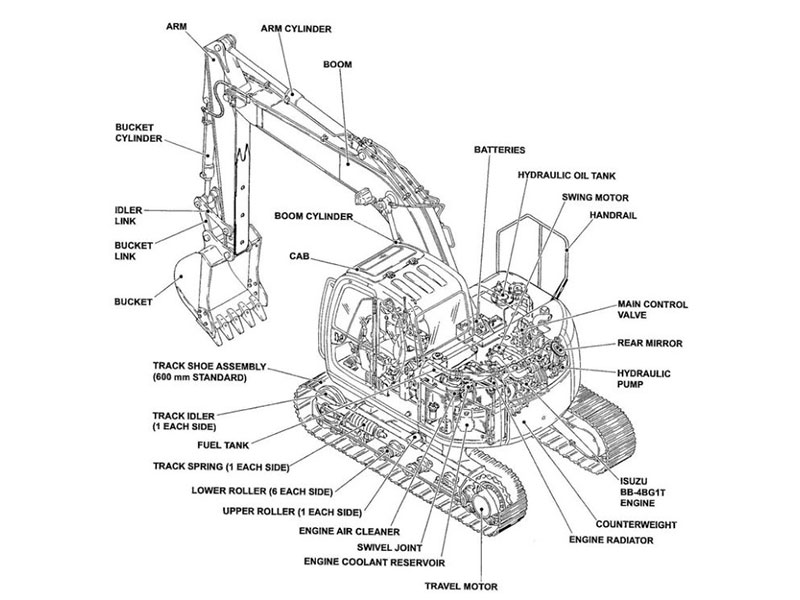
Diagrams show exploded views of assemblies. They act as visual maps. Each labeled point leads you to a part. The drawing reveals relationships. You can see which pieces fit together. This view saves time. You do not need to guess names. The diagram works with a paired parts list. Together they form the core lookup tool.
Reading Assembly Callouts
A callout is a reference number. It points to a spot on the drawing. The callout is not the part number. It is a locator. Think of it as a tag. The tag says “look here.” Use that tag to find the matching row in the parts list.
Catalogs often label the callout column as “Ref.” or “Item.” This column holds the reference number. Read the callout carefully. Two callouts can point to one row. One callout can appear multiple times. The parts list tells you which piece belongs in each location.
Sometimes letters accompany callouts. A letter identifies a view. “View A” might show the front assembly. “View B” might show the rear. Always match the view first. Then read the callout in that view. This step prevents mix-ups.
Matching Diagrams to Part Lists
Each diagram sits next to or near a list. The list contains rows. Each row matches one callout. The row gives the ordering number, description, and quantity. To use it, follow this sequence:
Find your diagram by section or index.
Read the callout in the diagram.
Find the same callout in the parts list column.
Copy the ordering number, not the callout.
Check the quantity for that assembly.
The ordering number is your true part number. The description confirms what you see. Read the description out loud. Compare it to the worn or damaged item. If the description says “seal kit,” then the callout might point to a group of seals. Order the whole kit unless the list says otherwise.
Use search and zoom features where the authorized catalog provides them. Keep the assembly page and publication revision with your ordering record.
An exploded view illustrates component relationships for identification. It does not establish a safe assembly or removal sequence; use the service manual for repair procedures.
Check model and serial applicability for the drawing and each relevant list entry. Also account for installed component identification and modifications before ordering Volvo excavator parts.
Read quantity and as-required entries together with their applicability notes and catalog legend. Confirm the required quantity for the actual repair scope before ordering.
Record the assembly page, callout, ordering number, description and application notes. This makes the identification basis easier to check before purchase.
Cross-Referencing with Serial Numbers
Every Volvo excavator has a unique serial number. This number identifies its build version. You need it before you look up any part. Without it, you cannot confirm fitment.
Finding Your Serial Number
Start with your machine’s serial number. The number appears on a plate or label attached to the machine. The exact position varies by model. Check the operator’s manual for the correct location. Service records and maintenance logs also show the number. Write down every digit. Do not trust your memory. The plate may sit in a hard-to-see place. Use a flashlight or take a photo to read it. Double-check the digits against your records.
Record the complete machine identification. For engine, pump or other component parts, also record their own plates and compare the installed assembly with the applicable catalog.
Confirming Compatibility
A serial range indicates the catalog’s stated application. Matching the range is an important check, but does not alone guarantee fitment after modifications or component changes. Read open-ended ranges and other conditions according to the catalog’s convention.
Check the range next to the part number. Read both numbers carefully. Compare them with your serial. One wrong digit changes the result. Match the full serial, not just the first few digits. A range may be listed in a column called “Serial No.” or next to the part description. Read the column header first.
Diagrams show serial ranges too. One drawing covers early machines. Another covers later machines. Select the drawing that matches your serial. Then read its part list.
Sometimes you find a gap between two ranges. This happens when a part changes at a specific serial. One range ends at one number. The next starts at the next number. If your serial sits at that boundary, read the note in the catalog. The note says “up to” or “from.” If the note is missing, ask your parts supplier for help.
Use any authorized digital lookup features available for your machine, and verify the returned application and notes. Do not assume a portal automatically proves compatibility.
If your serial falls between two ranges, order the part for the range that includes your machine. If no range includes it, stop. Contact your parts supplier. Give them the full serial and part number. They can verify the catalog revision. This step prevents a costly mistake.
Verify how the catalog defines the start, end and any boundary notes. If the stated application is unclear, request confirmation before ordering.
Tips for Accurate Ordering
Checking Quantity and Supersession
Confirm the listed quantity, its unit and the repair scope. For an as-required entry, consult its notes and the applicable service instructions rather than assuming a fixed count.
A supersession note may identify a current replacement or kit. Confirm serial applicability, related components and installation conditions before substituting numbers.
Condition | What to do |
|---|---|
Direct replacement | Confirm direct interchangeability and application before ordering |
Replacement with kit | Confirm the required kit and any associated components |
No supersession listed | Verify current application and ordering status before purchase |
When buying Volvo excavator parts, record the original and proposed replacement numbers and the supporting application confirmation.
Verifying Catalog Revision
Catalog revisions change over time. A newer revision may show updated part numbers or revised diagrams. Check the revision date or code on the catalog cover or footer. Compare it with the revision your supplier uses. An outdated catalog can make you order a discontinued part.
Component identification also matters. Confirm the model and serial number before you finalize any order. The catalog uses these details to narrow the correct section. If the revision and your machine details do not match, stop and verify with your supplier.
Follow the applicable handling, storage and service instructions. Use appropriate protective equipment and qualified personnel where the work requires it.
You now have a clear way to work through any Volvo excavator parts catalog. Start with the layout and index. Figure out each part number and symbol. Use diagrams to find the right callout. Match your machine serial number to the correct range. Check quantity, supersession, and revision before you order.
Practice with your own machine. Open the catalog for your model. Go through each step until the process feels easy. This habit builds confidence and speed.
Before placing the order, retain the catalog revision, machine and component identification, part numbers, quantities and written compatibility confirmation.
FAQ
What if my serial number falls between two ranges?
Do not guess. Check the catalog legend and boundary notes; if no listed range clearly includes your machine, provide full identification to the manufacturer or a qualified parts contact for clarification.
Can I order using the callout number on the diagram?
No. The callout is a locator, not an ordering number. It only points to a position in the drawing. Copy the ordering number from the matching row in the parts list. Then check the description and quantity. This step prevents wrong parts and returned shipments.
How do I know if a part number has been superseded?
Read the supersession note and confirm the replacement’s application, associated components and any installation conditions. If the current status is unclear, ask for written confirmation before ordering.
Why does the same part show different quantities in one diagram?
A drawing does not necessarily show every required occurrence. Read the listed quantity, unit and applicability notes, and confirm the repair scope. An as-required entry needs its stated conditions checked.
Retain the ordering and compatibility records with your service history.
Does a catalog revision affect the parts I order?
Yes. A newer revision may show updated numbers or revised diagrams. Check the revision date or code on the catalog cover or footer. Compare it with the revision your supplier uses. An outdated catalog can lead you to order a discontinued part. Verify your model and serial number before finalizing.
For Volvo excavator parts sourcing, consider YNF Machinery. Provide full machine and component identification, applicable catalog references and quantities, and request supported compatibility information, an actual quotation and written warranty and return terms before ordering.