

Check any volvo excavator parts catalogue pdf against this checklist before you order even one part:
Which models and serial numbers it covers
How correct the part numbers are and how well they cross-reference
Exploded diagrams and visual indexing
Revision and publication dates
How easy it is to search and navigate
Compatibility notes and supersessions
Where the source comes from and its licensing
Use this list as a quick screening tool. Run it first, and you catch weak or incomplete catalogs before they cost you a wrong order.
The PDF identifies parts. It does not tell you how to repair or install them. Keep that difference clear as you go through each item.
Key Takeaways
Make sure your machine’s model and serial number are within the range the catalog covers.
Read the part numbers closely and match the diagram callouts to the rows in the parts table.
Record the publication revision and check applicable supersession information before ordering.
Check that the publisher is legitimate and properly licensed before you trust the catalog.
Check every part number and supersession against official Volvo resources.
Evaluating a Volvo Excavator Parts Catalogue PDF
Why the Checklist Matters Before Ordering
A volvo excavator parts catalogue pdf is a reference for identifying parts. It shows you which part goes on your machine. It does not tell you how to remove, repair, or install that part. Think of it as a map of part numbers, not a service manual. Keep this difference in mind every time you open one.
Checking coverage, completeness and the selected entry can reduce ordering errors. A date or professional-looking layout alone does not establish accuracy. Confirm the relevant listing and current replacement information before relying on it.
What a Complete Catalog Should Contain
A useful catalog identifies its coverage and organizes the included systems into sections. Depending on its stated scope, it may cover the cab, hydraulics, undercarriage, attachments or engine, or only a specific component. Read the contents and reading guide, then check that all diagrams, associated tables and notes needed for your item are present.
Market-adapted equipment may also show up in the catalog. Different regions get different setups, and the catalog may list those variants side by side. Confirm that your machine’s setup is represented before you trust any listing. Check your model, serial number, and equipment options against the catalog’s coverage. A catalog that lists only one regional build may leave your machine out entirely. If your setup is missing, treat the catalog as incomplete and verify the part through another source. Ask your parts supplier to confirm the listing against your serial number when in doubt.
Model and Serial Number Coverage
Confirm Your Machine’s Range
Begin with your machine, not the catalog. Write down your model and serial number from the machine plate. Then open the catalog and locate the section that lists your model. Make sure your serial number falls within the range the catalog covers. A catalog made for a different range may list parts that seem right but will not fit your machine.
Match the complete model and machine identifier to the catalog’s stated coverage. A model name alone is not sufficient. Coverage can be expressed as ranges, breakpoints or other qualifiers rather than listing each identifier individually. Where engine or component variants matter, verify their separate identification and any documented modifications.
Check Serial Breakpoints and Variants
Serial breakpoints show where the manufacturer changed a part or an assembly. A catalog may divide one model into several serial groups. Each group can have its own parts table. A part listed for an early serial group may not fit a later machine. Read the breakpoint notes before you choose a part number.
Machine variants change the parts list too. Regional builds, cab options, and market-adapted equipment all affect which parts apply. The catalog may list these variants side by side. Confirm that your setup appears in the catalog. Do not guess fitment from the model name, the illustration position, or a part-number prefix. Check the serial breakpoint, the variant, and the part number together. When the catalog leaves your setup unclear, verify the part with your supplier before you order.
Part Numbers and Diagram Indexing
Verify Part Number Accuracy
Part numbers are the most important thing in any catalog. Read each number exactly as it is printed, one character at a time. Watch for characters that look alike, like a zero versus the letter O, or a one versus the letter I. One mistyped character can send you to a completely different part.
Different number formats can legitimately occur for different components, fasteners or numbering systems. Do not reject a document merely because formats vary. Read identifiers exactly and use applicable cross-references as leads, then confirm the current ordering number and replacement conditions for your machine. A casting mark is not automatically a service ordering number.
Read Diagram Callouts and Parts Tables
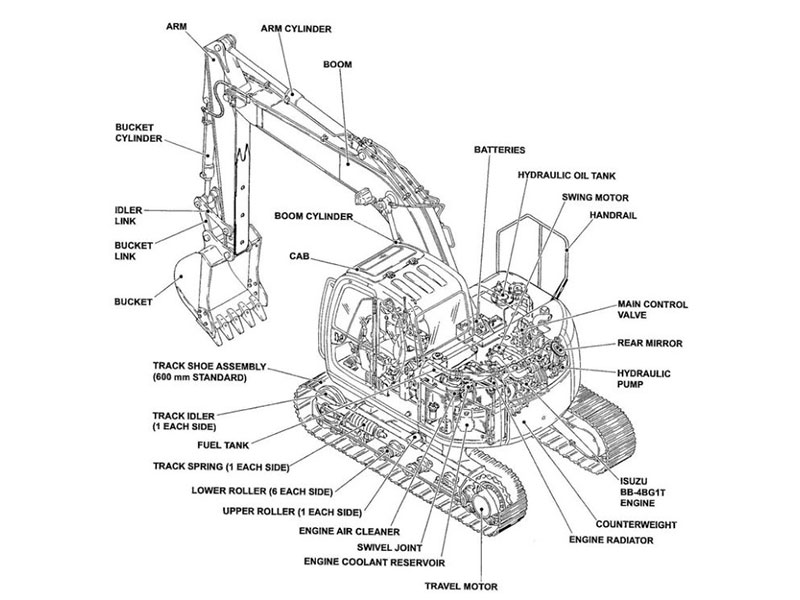
Exploded diagrams and parts tables work together as a pair. Each callout on the drawing points to a numbered item in the table. Follow this order:
Find your assembly on the diagram.
Write down the callout number next to the part.
Look for that same number in the parts table.
Read the description, quantity, and part number for that row.
Read the quantity column together with the stated basis: it may refer to one assembly, one side or a specified unit. Distinguish the required repair quantity from the illustrated quantity. Confirm the contents of any assembly or kit and which additional items are needed.
Section organization helps with visual indexing. The basic machine, cab, and engine sections each have their own diagrams and tables. Go to the correct section first, then search inside it. This structure narrows your view and cuts down on wrong matches. Never guess fitment from illustration position alone. A part drawn near your component may belong to a neighboring assembly. Match the callout, the table row, and the part number together, then check the result against your machine details.
Revisions, Searchability, and Supersessions
Check Revision and Publication Dates
Record the publication number, edition and revision where supplied. An older document may omit later replacement information, while a newer document may cover a different configuration. Check stated applicability and current supersessions; the publication date alone does not prove or disprove fitment.
If the revision cannot be identified, treat that as an uncertainty to resolve. Ask which publication the file reproduces and compare relevant entries with current applicable information. A date alone is not evidence that every entry is accurate.
Search Your Volvo Excavator Parts Catalogue PDF
Test the PDF text search with a known word or part number. Some files have a text layer; others are scans with incomplete or inaccurate OCR. Search results can miss entries or confuse similar characters. Verify the actual page image, table and notes before using a number.
Bookmarks and a linked table of contents can make navigation easier, but they are not guaranteed. Check what the file actually supports and use the contents, figure references and page numbers as needed. Confirm no necessary pages or notes are missing.
Supersession notes need your attention. A supersession tells you that one number replaces another. The replacement may require additional parts, so read the note in full. Confirm the current number and any extra items with your supplier before you purchase. Remember that the catalog identifies parts. It does not explain how to install them.
Source Credibility and Licensing
Assess Publisher Legitimacy
Find out who published the document before you trust it. A real publisher gives the company name, contact details, and what the document covers. Look for a copyright line and a clear statement of where it came from. If a file has no publisher, no date, and no contact information, you have no way to check its claims. Treat it as unverified.
Check the document’s stated usage and distribution terms and obtain it through a source permitted to supply it. Clear provenance helps trace a file, but does not by itself prove that the relevant pages are complete or current. Resolve missing or altered information before relying on it.
Cross-Verify with Official Volvo Resources
Use applicable manufacturer documentation or a qualified parts contact to check the selected listing and current replacement information. General product descriptions and archive pages may help identify a machine, but do not establish a particular part number’s fitment.
Provide the full machine identifier, relevant component information and configuration when requesting verification. Access methods and available documents vary, so do not assume a public search form covers every serial range. Read any supersession conditions and additional-item requirements. Resolve conflicting sources before purchase.
Do this final check before you order:
Your model and serial number are inside the catalog’s range
Part numbers match exactly, letter by letter
Diagram callouts match the parts table rows
The publication coverage and selected entry apply; current replacement requirements are checked
You read all supersession notes in full
The publisher and licensing are clear
Then check every part number and supersession against official Volvo resources. Confirm the model, serial number, part number, and specs together. A catalog identifies parts; it does not replace that check.
Keep the checked catalog entry and any written applicability confirmation with your order.
FAQ
How do I know if a catalog covers my machine?
Record the complete machine identification, then read the catalog’s coverage statements, ranges and qualifiers. The document need not list your serial number individually. Verify relevant component identification, options and later modifications, and request clarification if coverage remains uncertain.
Can I trust a part number from an unverified PDF?
Treat it as a lead, not a final answer. Read the number one character at a time and watch for characters that look alike. Then confirm it against official Volvo resources using your model, serial number, and specifications. A credible parts supplier will help you verify the listing before you buy.
What should I do when a catalog shows a supersession?
Read the full note first. A supersession means one number replaces another, and the replacement may need additional parts. Confirm the current number and any extra items with your parts supplier. Do not assume the old number still ships as listed.
Why does the revision date matter?
A revision helps identify the reference used and whether later updates need checking. It does not need to match the machine’s build date. Confirm stated coverage, selected entries and current supersessions. If the edition is unclear, resolve that uncertainty before relying on the listing.
Does a catalog tell me how to install a part?
No. A parts catalog identifies parts. It does not explain removal, repair, or installation. Use it to confirm the right number for your machine, then rely on the proper service information for the work itself. Keep those two jobs separate.
For Volvo excavator parts sourcing, consider YNF Machinery. Provide full machine and component identification, applicable part numbers and quantities, and request supported compatibility information, an actual quotation and written warranty and return terms before ordering.