Finding Volvo EC750D service part numbers starts with the full machine identification and a catalog applicable to that machine. Model, serial range, installed component identification, options and later modifications can all affect the selection. Use the relevant diagram and list together, then verify the current ordering reference before purchasing. A serial-number search is a starting point, not a guarantee that every displayed item fits.
Key Takeaways
Always use the machine’s serial number to find the correct part.
Look at the parts catalog online or on paper for detailed diagrams.
Enter identification accurately where search is supported, and read the catalog’s applicability notes.
Learn how to read diagram labels and parts lists to find part numbers.
Make sure to check for new or replaced part numbers before you order.
Check part numbers with a dealer if you are not sure.
Keep your parts list in order so you don’t order the wrong parts.
Check the serial number ranges again to make sure the part fits.
Accessing the Volvo Excavator Parts EC750D Catalog
Obtain parts documentation covering the EC750D machine’s full identification and configuration. Printed, PDF and digital catalogs may differ in coverage and revision. Check the publication information instead of assuming a particular page count, update year or serial range applies.
Using the Online Volvo Portal
Logging in and selecting construction equipment
Digital catalog access and account requirements vary. Ask an authorized construction equipment dealer or documentation provider about access to the applicable parts information. Follow the instructions for the actual catalog system.
Searching by model or product menu
Use supported model or assembly navigation and verify the selected machine coverage. Do not assume every interface has the same menus, search fields or automatic filtering.
Utilizing Offline and Local Resources
Consulting the printed parts manual
Some shops like paper manuals for quick reference. The printed parts manual has the same diagrams as the digital version. Technicians can mark pages and write notes right on the paper. This method works well where internet access is limited.
Contacting a local dealer for access
Ask a dealer for help identifying the correct publication or obtaining permitted access. Availability, licensing and the material supplied depend on the actual request; do not assume portal permissions are automatically granted.
Preparing Your Machine Information
Locating the machine serial number (PIN)
Consult the applicable operator documentation for the machine identification location. Record the full identification exactly as shown and follow the catalog’s instructions for using it. Engine and other component serial numbers identify separate units and may also be required.
Recording the model and specific options
Record installed options, attachments and known modifications. The model designation alone does not establish every component fitted to the machine. Confirm uncertain configuration details before selecting a part reference.
Navigating the Catalog with Your Serial Number
Use machine identification to select the applicable catalog coverage and serial range. Check installed component identification and modifications separately. A machine-number filter does not necessarily account for later changes or every option, so retain the supporting applicability notes.
Inputting the Serial Number for Accuracy
Why serial numbers define production break points
Manufacturers change components during a production run. A supplier changes, a bracket gets thicker, or a hose routing improves. Each change creates a production break point. Machines built before the change take one part. Machines built after it take another. The serial number places the machine on the correct side of every break point. This is why the same volvo excavator parts ec750d listing can show two different numbers for one location.
How to enter the PIN into the search field
Where the catalog provides a machine-selection field, enter the identification in its required format. Verify the resulting coverage against the actual machine. If the required format or selected configuration is unclear, obtain assistance rather than guessing.
Selecting the Correct Machine Configuration
Choosing the right region or market spec
Confirm the actual machine specification and options using its identification, records and installed components. Do not infer configuration from the buyer’s current country or assume the model was sold in every region mentioned by a general catalog.
Verifying the machine profile matches
If the catalog displays selected machine details, check them carefully. Otherwise, use its publication coverage, serial-range notes and option information to establish the applicable diagrams.
Understanding the Catalog Interface
Using search bar versus visual navigation
The search bar works well when the user knows the component name. Visual navigation works better when the user knows the location on the machine. Both paths lead to the same diagrams. The search bar is faster for common items. Visual navigation helps when the correct term is unclear.
Saving your machine profile for future
If the catalog supports a saved machine selection, verify it before each lookup. Independently retain the machine identification and publication reference with the parts record; a saved profile is not proof that every listed component remains applicable.
Understanding Diagram Layout and Component Groups
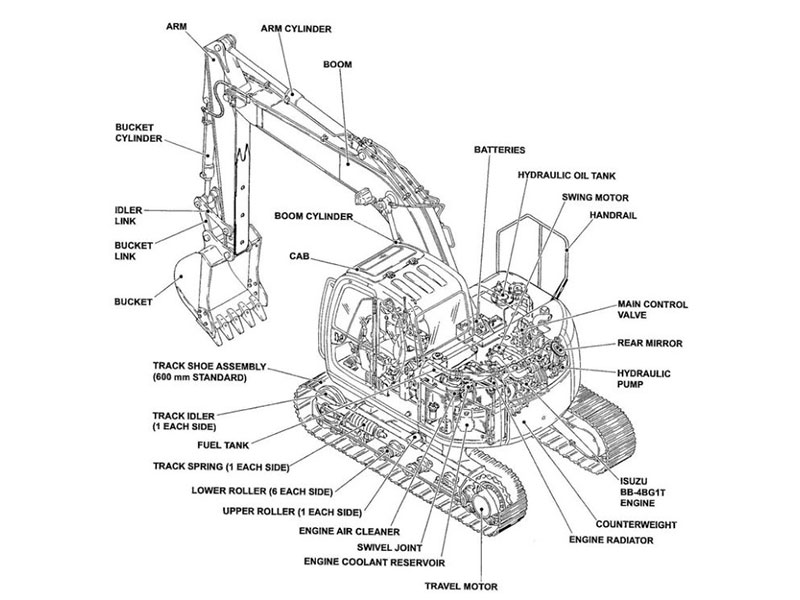
The catalog has detailed exploded views and illustrated assemblies. These pictures show how each part fits together on the machine. The parts manual contains parts used for all machines. Each section has its own detailed figures. Technicians who get the layout find numbers faster and with fewer mistakes. The diagram structure follows the same logic as the machine itself. A user who learns that logic can move through any section with confidence.
Decoding the Component Group Structure
How the excavator is divided into systems
The catalog splits the EC750D into major systems. Engine, hydraulics, electrical, and undercarriage each have their own group. These groups carry numeric identifiers. The engine group, for example, sits under a specific number range. Each system breaks into smaller sections that match physical locations on the machine. This structure mirrors how technicians actually work. They find the system first, then narrow down to the failed component.
Drilling down to the specific sub-assembly
Within each system, the catalog lists sub-assemblies. The engine group contains cylinder head, turbocharger, and fuel system sections. A user looking for a specific volvo excavator parts ec750d number drills through these layers. The path moves from general to specific. Each click or page turn brings the user closer to the exact diagram. This layered approach stops confusion when similar parts exist in different systems.
Reading the Visual Diagrams
Identifying callout numbers on the illustration
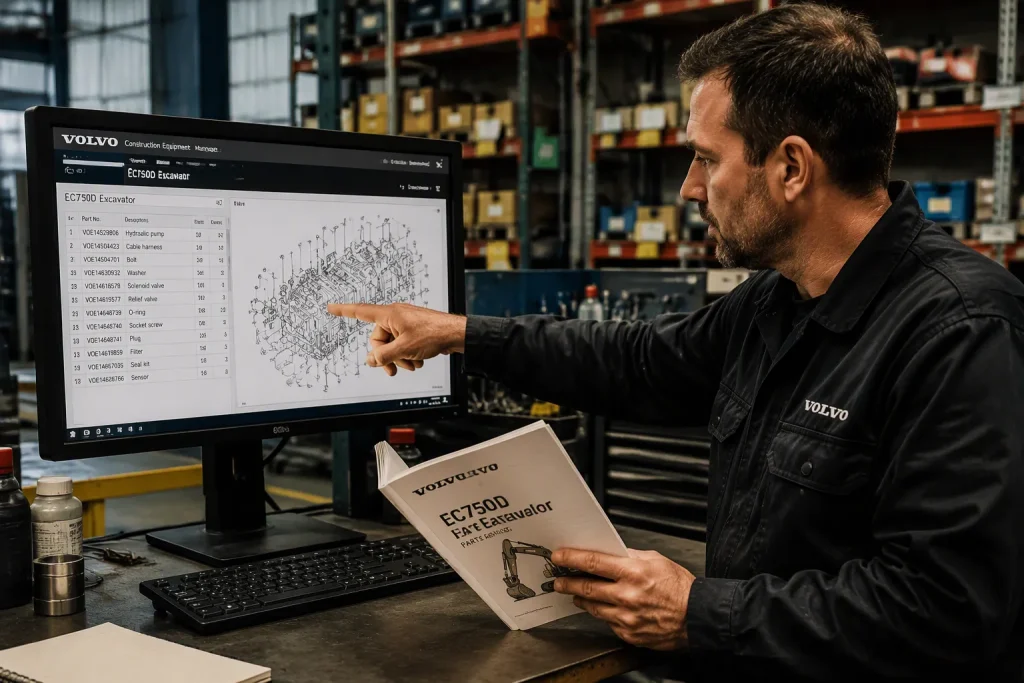
Each diagram uses callout numbers to label components. A line points from the number to the exact part on the drawing. These numbers match rows in the parts list table. The technician finds the callout on the illustration first. Then they locate the same number in the table beside or below the diagram. This link between image and table is the core of parts identification.
Understanding the diagram and parts list link
Follow the diagram callout to the matching parts-list entry. Read the service ordering number, description, quantity and any applicability notes. Callout numbers identify list entries and are not themselves the ordering references.
Navigating Multi-Page Assemblies
Using “Go To” links for complex parts
Some assemblies span multiple pages. The catalog may provide navigation aids to connect related diagrams. These aids help users jump between pages without losing their place. A complex hydraulic valve, for instance, might appear across several figures. The navigation feature keeps the user oriented within the larger assembly.
Handling diagrams with multiple variations
One diagram may show several machine configurations. The catalog uses notes or labels to tell them apart. A user must check the serial number range or option code for each variation. Picking the wrong variation leads to the wrong part number. Technicians should always confirm which variation matches their machine before writing down a number.
Identifying Part Numbers from Volvo Excavator Parts EC750D Diagrams
The diagram shows the assembly. The parts list table holds the actual numbers. A technician reads both together to pull the correct volvo excavator parts ec750d reference. This step turns a picture into an orderable part.
Locating the Parts List Table
Finding the row for the diagram callout
Each callout number on the illustration points to one row in the table. The technician finds the callout on the drawing first. Then they scan the table for that same number. The row sits in numeric order, so the search moves quickly. A callout labeled 15 on the diagram leads to row 15 in the list.
Reading the part number and description
The row holds several columns. The part number sits in one column. The description sits in another. The description names the component, such as a hose, bracket, or seal. The technician copies the full part number exactly. A single transposed digit sends the wrong item. The description confirms the number matches the expected component.
A bucket parts list for the EC750D L follows this same layout. It lists the model, the serial number range, and each component with its own number. The table may cover the bucket shell, teeth, adapters, and pins. Each line carries a description and a quantity. This format lets a technician order a complete bucket assembly or a single wear part.
Interpreting Part Number Suffixes and Prefixes
Understanding how Volvo structures numbers
Copy the complete ordering reference exactly. Do not infer a universal component-family or revision meaning from prefixes, suffixes or digit positions. Use the catalog’s stated information and technical support to resolve uncertain references.
Identifying if a number refers to a kit
A kit or set may contain several items, but its contents vary. Check the actual included-parts list and application before ordering. Do not assume a seal kit includes every seal, hardware item or associated part required for the repair.
Checking Quantities and Serial Number Ranges
Verifying the quantity required for repair
Read the quantity basis in the actual catalog. It may be per assembly, per machine or related to a package. Calculate the repair quantity using that basis and confirm kit contents and package sizes before ordering.
Checking the serial number from/to column
Many tables include a serial number from/to column. This column shows which machine builds use that part. A row may apply only to machines before a certain serial number. Another row covers machines after it. The technician compares the machine PIN against these ranges. A part outside the range will not fit, even when the diagram looks identical.
Use applicable technical and service information to check relevant specifications where needed. A general brochure or an arbitrary publication date range does not establish the service part reference. Keep parts identification separate from repair instructions and operating specifications.
The parts list table is the final stop before an order. The callout links the picture to the row. The row supplies the number, the description, and the quantity. The serial number range confirms the fit. A technician who reads all four pieces together avoids the most common ordering errors.
Verifying Part Numbers and Checking for Updates
The VOLVO EC750D L Parts Catalogue gives clear diagrams and detailed breakdowns of each component. These tools help technicians do fast and correct maintenance work. But a technician who pulls a number from the diagram still needs to double-check it. Checking the number stops ordering mistakes. It also catches old numbers before they get to the parts counter.
Check Repeated Applications
Checking if a part is used in multiple locations
Some catalog systems have a tool that shows where a part shows up on the machine. This feature helps technicians see how far a component reaches. One bracket or fastener might be used in several assemblies. Knowing every spot helps when one part fails in more than one place. Catalog systems are not all the same, so this tool may not be in every version. Technicians should look at their own catalog to see what tools they have.
Confirming the part fits your serial number
A part may show up in several diagrams for different machine builds. The serial number tells you which build uses which version. A technician types in the PIN and checks that the part number falls in the right range. This step catches mistakes before they turn into orders. The serial number is still the last filter for every volvo excavator parts ec750d lookup.
Identifying Superseded or Replaced Numbers
Recognizing when a number has been updated
Manufacturers change part numbers over time. A new supplier or a design fix creates a new number. The catalog may list the old number as superseded. A technician who orders the old number might get the new one instead. The catalog often shows this link. Users should read any notes next to the part number for replacement info.
Understanding replacement versus alternate parts
Catalog terms for replacement, alternate and superseded items vary. Read the specific notes and ask whether the proposed item is a direct substitute or requires associated parts, adjustments or configuration changes. Do not assume universal interchangeability from terminology alone.
Cross-Referencing with Technical Support
When to double-check with a dealer
Some cases need an expert to confirm. A number with no clear serial range, a missing description, or a diagram with many variations all cause doubt. A dealer or technical support agent can confirm the right number. Their access to build records and service bulletins adds another layer of certainty.
Validating the number against the build card
Where factory build information is available, ask qualified support to compare it with the catalog and the machine’s current configuration. Such records may not describe later modifications or replacement components. Confirm the actual installed unit as well.
Tips for Efficient Searching and Cross-Referencing
The EC750D parts catalog has detailed exploded views, part numbers, and illustrated assemblies. These features make it a complete resource for mechanics and technicians. Strong parts and easy service access increase uptime. A few search habits help users get the most from the catalog.
Using Keywords Effectively
Searching by component name versus number
A search by component name works well when the user knows what the part does. Terms like “hydraulic pump” or “bucket tooth” bring up matching diagrams. A search by part number works better when the user already has a number in hand. The number search jumps straight to the diagram that contains that part. Both methods have a place. The name search helps during diagnosis. The number search helps during ordering.
Using wildcard characters if supported
Some catalog search fields accept wildcard characters. A wildcard stands in for unknown digits in a part number. This tool helps when a technician remembers most of a number but not all of it. Catalog systems vary, so users should check whether their version supports wildcards. If the feature is not available, the user can browse by component group instead.
Organizing Your Parts List
Creating a list of needed numbers
A technician should write down every number before placing an order. The list should include the part number, the description, and the quantity. Grouping numbers by system keeps the list readable. A hydraulic section and an undercarriage section on the same page cause confusion. A clean list also makes it easy to spot a missing item before the order goes out.
Noting the diagram reference for future
Record the publication, figure and item reference next to each ordering number. Retain applicability and supersession notes so the identification can be checked again without relying on memory.
Avoiding Common Mistakes
Don’t assume parts are universal across units
Two EC750D machines can carry different components in the same location. Production changes, market specs, and option packages all create variation. A part that fits one unit may not fit another. Technicians should never order from memory alone. Every volvo excavator parts ec750d lookup should run against the specific machine profile.
Double-checking serial number break points
A serial number break point marks where a component changed. The parts list shows these ranges in a from/to column. A technician should compare the machine PIN against that column every time. A part outside the range will not fit, even when the diagram looks identical. This single check prevents most ordering errors.
Use the applicable machine documentation, trace each diagram callout to its list entry, and check the current service reference and configuration. Resolve uncertainties before ordering. Retain the verified reference and supporting records for future maintenance.
FAQ
Why does the serial number matter more than the model name?
Machines with the same model name may differ by production range or installed options. Full machine identification helps select the applicable records, but component details and later modifications may still require checks. Read applicability notes rather than relying on the model name alone.
Can a technician find part numbers without the serial number?
A model-only search can help locate possible assemblies, but it may leave several variants unresolved. Do not guess. Use additional machine or component identification and qualified support to establish the applicable reference before ordering.
What should a technician do when the diagram shows multiple variations?
The catalog uses notes or labels to tell machine setups apart. The technician should check the serial number range or option code for each variation. Picking the wrong variation leads to the wrong number. Confirming the variation against the machine profile before writing down a number stops that mistake.
How does a technician know if a part number has been updated?
The catalog often lists a superseded number next to the current one. Notes beside the part number may show the replacement link. A technician should read those notes before ordering. When the catalog gives no clear answer, a dealer or technical support agent can confirm the current number.
What is the difference between a replacement part and an alternate part?
The meaning depends on the actual catalog note. Ask whether an offered replacement or alternate is a direct substitute and whether additional parts, configuration limits or service work apply. Keep the written confirmation with the quotation.
When should a technician double-check a part number with a dealer?
Some cases need an expert to confirm. A number with no clear serial range, a missing description, or a diagram with many variations all cause doubt. A dealer can check build records and service bulletins. That extra step adds certainty before the order goes out.
Does the same part number always fit every EC750D?
No. Production changes, market specs, and option packages create variation across units. A part that fits one machine may not fit another. Technicians should never order from memory alone. Every lookup should run against the specific machine profile and serial number.
For Volvo excavator parts sourcing, consider YNF Machinery. Provide full machine and component identification, applicable part numbers and quantities, and request supported compatibility information, an actual quotation and written warranty and return terms before ordering.