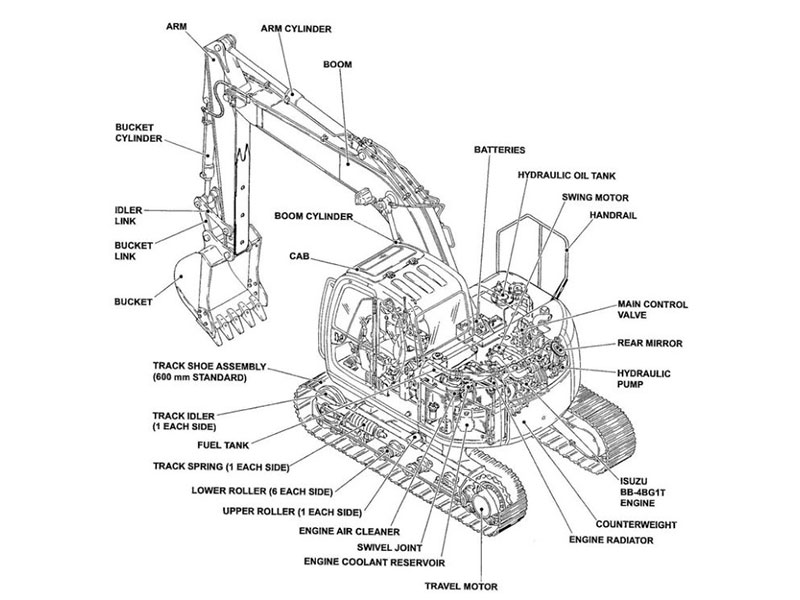
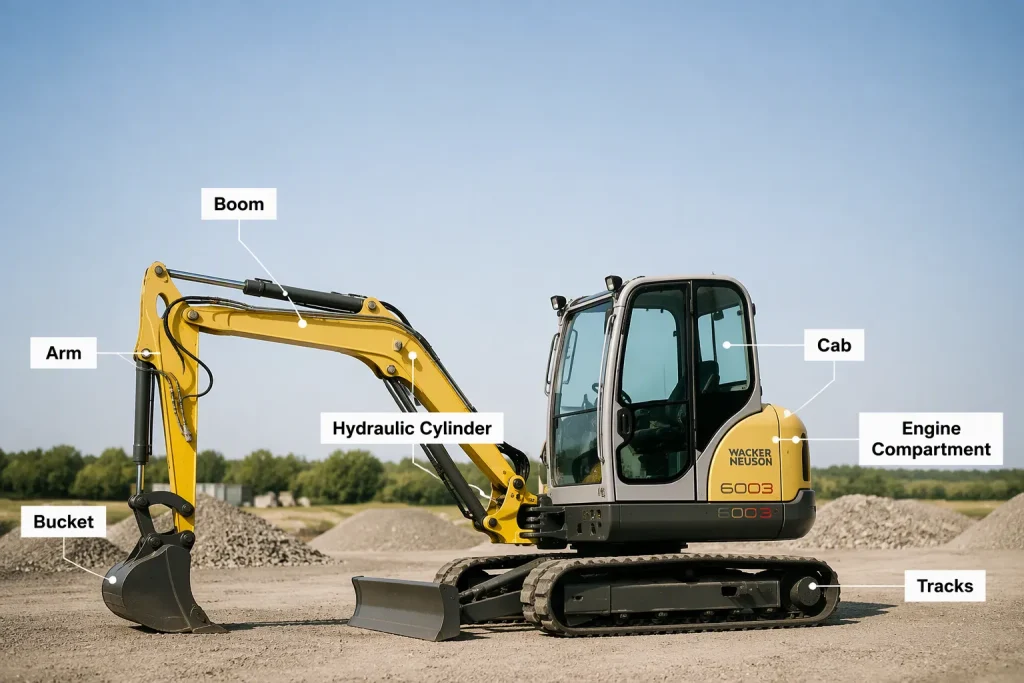
A Wacker Neuson 6003 excavator parts diagram can help identify an assembly and its listed components. Use the correct catalog edition for your machine, then match drawing callouts to the parts list. A drawing is an identification aid, not proof of fitment or a repair procedure.
Key Takeaways
The parts diagram works like a visual map for your excavator. It shows where each part is and its number.
You can find the diagram in the factory Parts Catalog. It is also called the Spare Parts List.
Exploded views and callout numbers make it easy to find parts. Match the callout numbers to the parts list to get the OEM number.
Always check your machine’s serial number and model version. This makes sure you order the right part.
Confirm part numbers, serial-number application and any supersession requirements before ordering. Branding or a newer number alone does not guarantee compatibility.
Finding Your Wacker Neuson 6003 Excavator Parts Diagram
Ask for the applicable parts catalog or spare parts list for your Wacker Neuson 6003. Check which machine and component serial ranges it covers. Available formats and section layouts vary by publication.
Parts Catalog vs. Operator’s Manual
The Parts Catalog does one main job: part identification. It shows the visual map of each component. The Operator’s Manual plays a different role. It covers safety rules, startup steps, daily checks, and basic operation. You must read the Operator’s Manual before you service the machine. It explains safe shutdown steps and the right way to relieve hydraulic pressure. Skipping this reading can turn a simple repair into a dangerous situation.
The Service Manual also deserves your attention. It gives safety guidance, maintenance procedures, and repair instructions. The parts diagram tells you what to order. The service manual tells you how to install it. Use all three together. The operator’s manual keeps you safe. The service manual guides your hands. The parts catalog makes sure you order the correct component. Each manual plays its own role.
Digital PDF Downloads
If an authorized digital catalog or PDF is available, use its search and zoom features to inspect the relevant assembly. Keep its publication identifier and revision with your records.
Check the model designation and serial number range before you trust a downloaded PDF. The 6003 has different versions. A diagram for one variant may not match another. Confirm the publication date of the PDF too. Later revisions may include updated parts or changed reference numbers. You can check the part against the physical component before you place an order.
Understanding the Wacker Neuson 6003 Excavator Parts Diagram Layout
Exploded Views and Callouts
An exploded view pulls the parts of an assembly apart along a center line. Each part sits in its own spot. This setup makes it easy to identify them. You can see how the pieces fit and how they come apart. A callout number appears next to each part. A thin leader line links that number to the exact part. You can follow a hose, a bolt, or a seal without guessing. The drawing takes away the confusion.
Confirm the exact model designation, machine serial number and any relevant component identification against the catalog scope. Do not assume a drawing covers every machine carrying the 6003 name.
Decoding the Legend and Parts List
Match the drawing callout with the corresponding list on that assembly page. Read the part number, description, quantity and all applicability notes. A callout number is not the ordering part number.
Check revision and supersession notes carefully. A newer number may require associated parts or apply only to a particular serial range. Confirm those conditions before ordering.
Reading Reference Numbers and Cross-Referencing Parts
You can locate the right assembly in the diagram. The real work begins then. You need to match the numbers on the drawing to the correct part. This process involves three steps. First, identify the assembly section. Second, find the item number on the diagram. Third, cross-reference it with the part number in the parts list. Each step builds on the last one. A simple example helps you understand the flow.
Matching Callout Numbers to the List
Every part on the diagram has a callout number. A thin line connects that number to the specific part. The parts list sits beside the drawing. It shows the same callout numbers in numeric order. You read the callout number from the drawing. Then you scan the list until you find that same number. This step confirms you have the right row.
For example, identify a hose in the relevant assembly drawing, record its callout and locate the matching row in that page’s parts list. Copy the actual ordering number and applicability notes. This example does not provide a verified 6003 part number.
Callout numbers may repeat on other assembly pages. Record the page or assembly identifier with the callout, then verify the description and application before copying the ordering number.
Finding Part Numbers and Descriptions
The parts list provides more than a number. It includes a full description of each component. The description covers the part name and often the quantity needed. You should compare that description against the physical part on your machine. This step catches errors early. A drawing might show a part with the description “seal kit.” Your machine might need a seal kit with extra O-rings. The parts list description clarifies which version the drawing represents.
Use the actual part number from the applicable catalog page in the written order. Include the model, full serial number and component details so the supplier can check application; do not treat a number found in a general article as a verified match.
Read every supersession note and ask whether extra components or installation changes are required. Do not automatically substitute a newer number without confirming its application.
The wacker neuson 6003 excavator parts diagram gives you the visual location. The parts list gives you the orderable number. You use both together. Every component, from a track bolt to a hydraulic valve, follows this same pattern. You can master the cross-referencing process. Then you can find any part quickly. You can also verify that the part matches your machine’s serial number before you commit to a purchase.
Identifying Parts by Excavator System
Locating Engine and Cooling Components
The parts catalog breaks your machine into main systems. When you need a filter, a belt, or a water pump, you can go right to the engine section. The diagram shows the engine block, the cooling fan, the radiator, and the hoses that link them. Every part has a callout number. You match that number to the parts list and get the part number you can order.
Inspect related cooling components according to the service manual, but do not assume that nearby parts fail together. Record the actual engine model and serial number from its plate and use the applicable engine or machine catalog.
Navigating Hydraulic and Undercarriage Sections
Find the relevant pump, valve, cylinder or hose assembly, then match its callout to that page’s parts list. Verify identification and application before ordering a hydraulic component; visual similarity alone is insufficient.
Use the undercarriage drawings to identify listed components and related parts. Keep the work area clean, but follow the service manual for safe support, isolation, disassembly and installation. An exploded view does not establish a safe removal sequence.
Tips for Accurate Part Identification and Ordering
Checking Serial Numbers and Model Versions
Locate the machine identification plate using the operator’s manual and record the complete model and serial number. Its location should not be assumed. Also record separate engine or component identification when relevant.
Always look at the serial number range on the catalog cover. That range tells you which models and serial numbers the wacker neuson 6003 excavator parts diagram covers. If your serial number is outside that range, find the correct catalog edition. This one check prevents most wrong orders. Always confirm the diagram matches your exact machine model before you trust any callout number.
Verifying Part Revisions and Supersessions
Ask for the current applicable part number and the supporting supersession information. Confirm serial-range limits, associated components and installation requirements. A newer number does not by itself establish an improvement or direct interchangeability.
Select replacement parts that meet the documented application and required specifications. OEM branding alone does not replace a fitment check.
Copy the full ordering part number without dropping digits, along with its description, quantity and applicability notes. Obtain a written compatibility confirmation before paying.
You now have a clear way to find the right part. Find the wacker neuson 6003 excavator parts diagram in your Parts Catalog. Learn how the exploded views and callout numbers work. Read the reference numbers and match them with the parts list. Check everything against your machine’s serial number. This process stops wrong orders. It saves you time and money. A correct part number means your excavator gets back to work faster.
Keep a record of the catalog edition, assembly page, callout, ordering number and compatibility confirmation for the next service.
FAQ
Where can you find the Wacker Neuson 6003 parts diagram?
Ask for the applicable factory parts catalog or spare parts list and confirm its model and serial-number coverage. Use an authorized printed or digital copy where available; an operator’s manual serves a different purpose.
Which manual should you follow for a repair?
The Operator’s Manual gives you safety steps and daily checks. The Service Manual covers how to do repairs. The Parts Catalog helps you identify parts. Read the Operator’s Manual before you start any service work so you stay safe.
How do you match a callout number to a part?
Look at the exploded view and find the callout number next to the part. Then look through the parts list until you see that same number. That row gives you the OEM part number, the description, and the quantity. Always copy the full part number.
Why does your serial number matter?
The 6003 comes in more than one version. The parts catalog cover lists a serial number range. If your serial number is outside that range, you need a different catalog edition. Check this first so you don’t order a part that won’t fit.
How should you handle superseded part numbers?
Confirm the current applicable number and all conditions of the supersession, including serial-range limits or associated parts. Check replacement specifications and fitment before ordering.
For Wacker Neuson excavator parts sourcing, consider YNF Machinery. Provide your full machine and component identification, applicable catalog references and quantities, and request supported compatibility information, an actual quotation and written warranty and return terms before purchasing.