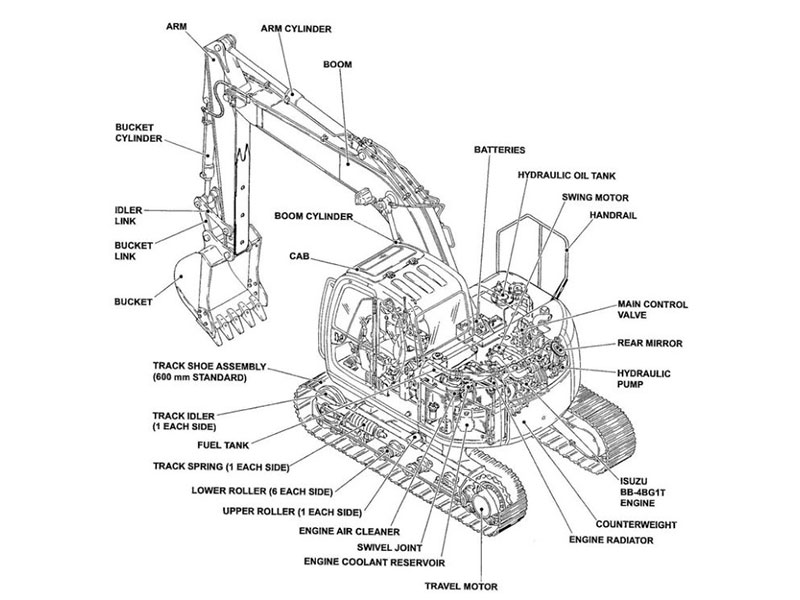
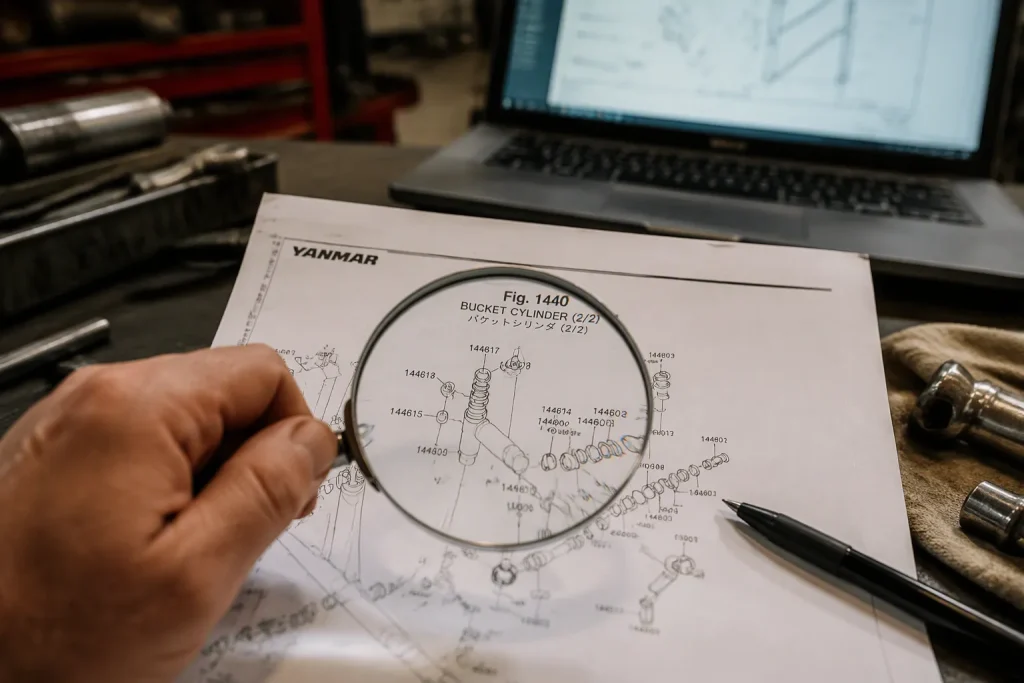
You face a frustrating situation. Your Yanmar excavator needs a specific part, yet the Yanmar excavator parts diagram looks like a confusing web of lines and numbers. You need a fix, not confusion.
Start by finding your machine’s identification plate. You will see it on the chassis or near the engine. Write down your model and serial number. This info unlocks the right Yanmar excavator parts manual for your machine.
This guide gives you a clear, simple plan. You will go from confusion to ordering with confidence. You will learn to read diagrams well. You will steer clear of costly errors. You will save precious time. Getting good at this turns a hard job into an easy one. You can handle this task with ease.
Key Takeaways
-
Find your Yanmar model and serial number first. This info unlocks the correct parts manual.
-
Use the ‘I’ column in the parts list. It shows which part fits your engine serial number.
-
Check color codes in diagrams. They show different versions of parts.
-
Match reference numbers between the diagram and parts list. This confirms the exact part.
-
Always order genuine OEM parts. They fit correctly and keep your machine safe.
Start with Your Yanmar Model and Serial Number
Finding the Identification Plate
First, you need to find the identification plate on your machine. This plate holds the important details you need. You will see it on the chassis or near the engine. The exact spot changes based on your model.
For air-cooled L series engines, look for a sticker on the cooling air conveyor. This sticker faces the power take-off side. For liquid-cooled TN series engines, you will find a metal plate attached with four rivets on the valve cover. This plate is on the fan side of the engine. The table below shows where to look.
|
Engine Series |
Identification Plate Location |
Example Format |
|---|---|---|
|
L series (air-cooled: L-AE/L-EE/LN/LV/LW) |
Sticker on the cooling air conveyor, facing the power take-off |
Model: L100N5EA1C1CAID / Serial No.: S12345 |
|
TN series (liquid-cooled) |
Metal plate attached with 4 rivets on the valve cover, fan side |
Model: 4TNV88-DSA / Serial No.: 012345 |
Take a photo of this plate with your phone. You will need this info for every parts search you do. Write down both the model number and the serial number. Keep this record in a safe spot, maybe inside your operator’s manual.
Why Serial Numbers Matter for Diagram Selection
Your serial number is the main filter in the official Yanmar parts portal. This number tells the system which version of your excavator you have. Makers change things during production. A part for a 2018 model may not fit a 2021 model with the same name.
Using the wrong serial number takes you to an incorrect diagram. You then order parts that do not fit your machine. This mistake costs you time and money. You may also pay return shipping and wait longer while you get the right part.
The official Yanmar website uses your serial number to show the correct Yanmar excavator parts manual. Each manual matches a certain serial number range. You need to match your number to the right range. This step makes sure you see the correct diagram for your machine.
Your parts manual has detailed drawings for every assembly group. The diagrams show each part with a reference number. You will match these numbers to the parts list. This process works only when you start with the right manual. The serial number guarantees this from the start.
Remember, OEM parts need exact identification. Aftermarket suppliers cannot help without your model and serial number. Your search becomes faster and more reliable when you give this info first. You avoid guesswork and mistakes.
Decoding the Yanmar Excavator Parts Diagram Layout
Your Yanmar excavator parts manual uses a clear layout. You need to know two key features. The serial number ranges and the color codes guide your search. These features stop mistakes. You save time and money.
Understanding Part Numbers and Compatibility
This manual has detailed diagrams. Each diagram shows an assembly for your excavator. The parts list sits next to the diagram. The parts list includes compatibility information tied to engine serial number ranges. You need to match your engine serial number to the correct range. If it does not match, you need a different part number. A blank space or no range means the part fits all serial numbers.
Yanmar changes parts during production. They improve materials or fix issues. The serial number ranges track these changes. They show forward and backward compatibility. A number in the list refers to an engine serial number range. Your engine serial number must match this range. If it does not match, you need a different part number.
This compatibility information is vital for older excavator models. These models often have many updates. Checking the serial number range stops you from ordering the wrong part. You check it against your engine serial number. You confirm the correct OEM part for your machine.
The manual for your Yanmar excavator uses these ranges to avoid confusion. You see one diagram for an assembly. The parts list shows several part numbers. The serial number range tells you which one fits your machine. This system works well when you use it right.
Always check the compatibility information during your search. Ignoring it leads to wrong orders. You waste time and money. You also face return shipping costs. The serial number range saves you these problems. Your parts manual may also reference the engine serial number directly. This extra detail helps with accurate selection. You match your engine number to the range shown. You confirm compatibility before you order. This step is quick but key for getting the right part.
Interpreting Color Codes and Reference Numbers
Your Yanmar excavator parts diagram uses color codes. These colors indicate different systems, such as hydraulic (blue) or electrical (red). You must find the legend in your manual. This legend explains what each color means. You find these features in your parts diagrams. You need to match your machine’s system.
The portal provides exploded views for engine models. The color key tells you which system each part belongs to. Always check this key before ordering. The key appears at the start of each manual section.
Reference numbers link the diagram to the parts list. You find a part in the diagram. You see a reference number next to it. You match this number to the parts list. The list gives the part number and description. This process works for every part on your machine.
Exploded views show how parts fit together. These views make assembly clear. You see the order of items. You understand how parts relate. This helps during replacement. You know which parts to remove first. The excavator diagram is a visual tool. The reference numbers are your link to the correct OEM part. You move from the picture to the list. You check the part number matches your needs.
Your parts manual may use different colors for different setups. One model may have two hydraulic systems. The color code tells you which diagram applies. You avoid confusion with this system. The color code key sits at the start of your manual. It also appears on the portal page. You find this key before you start your search. You refer to it as you work through the diagrams. This habit stops errors in your part selection.
Step-by-Step: Reading Your Yanmar Excavator Parts Manual

Navigating the Parts List and Diagram Together
You start your parts lookup by picking the right assembly group in your yanmar excavator parts manual. For a hydraulic hose, you open the hydraulic system section. The yanmar excavator parts diagram shows an exploded view of the assembly. Each part has a reference number next to it.
Follow these steps to go from the diagram to the correct part number:
-
Locate the part in the diagram – You find the hose in the exploded view. You write down the reference number beside it.
-
Match the reference number in the parts list – You look at the parts list on the same page. You find the same number in the list. The list shows the part number, description, and quantity.
-
Check the legend for symbols and color codes – The legend explains every symbol in the diagram. You see symbols for torque specs and service limits. Blue may mean hydraulic parts. Red may mean electrical parts. You match the colors to your excavator setup.
-
Read the annotations and manufacturer notes – The parts manual includes notes about assembly and compatibility. A note may say the part fits only a certain serial number range. You read every note before you order.
-
Learn the technical terms and abbreviations – Familiarize yourself with specialized jargon and common abbreviations used in excavator diagrams to quickly identify parts.
-
Verify with the parts list – The yanmar excavator parts diagram is a simple drawing. The parts list has the exact data. You always confirm the diagram info with the list. The list gives you the precise OEM part number you need.
-
Check torque specifications – Every bolted joint in the diagram has a torque value. Using the wrong torque leads to mechanical failure. You note the spec before you assemble the replacement part.
Your parts manual uses these elements to guide you to the right part. The diagram shows how parts fit together. The list confirms the exact part number. This mix removes guesswork from your parts lookup.
Cross-Referencing with Your Operator’s Manual
Your operator’s manual holds detailed specs for your excavator. You cross-reference the part number from the parts diagram with this manual. The manual describes the function of each part. It also lists service limits and maintenance intervals. This info helps you decide if you need a replacement or a repair.
You access online tools through portals like website for faster diagram searches:
-
Engine Exploded View section – A direct link to exploded diagrams for engine models on the portal
-
Select and buy portal – A dedicated page for viewing and buying parts through exploded views
-
Browse the catalogue link – An online flipbook catalogue for browsing parts at your own pace
-
Reserved area – A section for getting model-specific diagrams with your serial number
-
Exploded Views navigation item – A general section for all available diagrams for your machine
You enter your model and serial number. The system shows the correct diagrams for your excavator.
You check for updates to the diagrams often. Yanmar releases new diagrams when parts change during production. Online portals provide access to current diagrams. This habit stops you from ordering parts that no longer fit your machine.
Your operator’s manual also contains wiring diagrams and hydraulic schematics. These add to the parts diagrams. You use both manuals together for a full view of your excavator. Using both resources gives you accurate parts identification every time.
You always choose OEM parts for your replacements. OEM parts match the specs in the diagrams exactly. They fit correctly and work as intended. This choice protects your machine and extends its service life.
Apply Your Knowledge for Accurate Parts Ordering
Avoiding Common Mistakes When Ordering
Know the key features of your Yanmar excavator parts manual. The most common error is ignoring the compatibility information based on serial number ranges. Many users order the first part number they see without checking this range. The result is an obsolete part that does not fit. Your engine serial number must match the range shown. Your Yanmar excavator parts manual displays this information clearly. Check it every time you order.
Misreading color codes is another common mistake. The colors in the diagram indicate different systems (e.g., hydraulic, electrical). The legend explains these codes. Using the legend helps avoid this mistake.
Using non-genuine parts creates real risks. Aftermarket components differ in material quality and tolerances. A poor fit leads to premature wear or system failure. Avoid these problems by choosing genuine OEM parts. Your excavator operates safely with proper components. Verify authenticity before ordering. Look for official packaging and holographic labels. Never rely solely on the diagram image. Always confirm the part number in the parts list before purchase. Always order genuine OEM parts for your excavator.
Leveraging Dealer Support and Online Resources
Your dealer provides expert help when your parts manual remains unclear. Dealers have direct access to factory updates. They confirm part numbers for your machine. Bring your model and serial number when you call. This helps the dealer locate the correct parts quickly.
Online portals offer tools for parts lookup. Enter your model and serial number on the portal. The system displays the correct diagrams for your excavator. The portal is a reliable source for accurate specifications. Cross-reference between your sources to strengthen accuracy. Compare the part number from the diagram with your operator’s manual. Use online lookup tools to confirm compatibility.
Online forums provide practical advice from owners. Users share installation tips. Always verify community advice against official sources. Your parts manual and dealer remain the final authority for part selection.
You now hold the skills to read any yanmar excavator parts diagram with confidence. Start with your serial number. Understand the layout. Cross-reference every detail. These steps prevent costly ordering errors.
Mastering the yanmar excavator parts manual reduces downtime significantly. You identify the correct component the first time. You avoid return shipping delays. Your machine returns to work faster.
Always use reliable online portals for your searches. Choose genuine oem parts for safety and longevity. These components meet exact specifications for your excavator. Aftermarket options create unnecessary risk.
You now possess the knowledge to handle parts identification with ease. Your next repair starts with clarity.
FAQ
Where Do I Find My Yanmar Excavator Serial Number?
You will find the ID plate on the chassis or near the engine. Air-cooled L series engines have a sticker on the cooling air conveyor. Liquid-cooled TN series engines have a metal plate on the valve cover. Take a photo for your records.
What Does the Compatibility Information in My Parts Manual Mean?
The parts manual uses engine serial number ranges to indicate compatibility. You need to match your engine serial number to the correct range. This step prevents ordering mistakes.
How Do I Know If a Part Is Obsolete?
Your Yanmar parts manual shows new part numbers in the parts list. Online portals show current availability. If the diagram shows a part number that is different from the list, use the newer number. Contact your dealer to confirm the replacement part exists.
Can I Use Aftermarket Parts Instead of Genuine OEM Parts?
Always choose genuine OEM parts for your excavator. Aftermarket parts may have different quality and fit. These differences can cause early wear or system failure. Check official packaging and labels before buying to make sure they are real. Your machine works best with parts that match factory specs.
Why Do Diagrams Show Different Colors for the Same Part?
Colors in the diagrams indicate different systems, such as hydraulic (blue) or electrical (red). The legend explains the color codes. You must check the legend to match your machine’s configuration.