Gather these items before you start any parts lookup:
Full model and serial number
Component identification
Configuration and modification notes
Existing part markings
Clear photos and required quantities
Catalog coverage details
Having complete information keeps you from ordering the wrong part. It also saves time on every parts lookup.
Record the complete machine model and identification exactly as shown in the identification records. Photograph markings on the existing component without assuming they are service ordering numbers. Then check the catalog coverage and relevant entry.
A simple checklist keeps your parts lookup running smoothly. Gather everything first, then check the fit with a dealer when you are not sure.
Key Takeaways
Write down your machine’s model and serial number exactly as they appear on the ID plate.
Record and photograph existing component markings as lookup clues.
List all attachments and changes to make sure you match the right part.
Take clear photos from different angles and write down how many you need.
Look at the serial number ranges in the catalog, and check with a dealer to make sure the part fits.
Gather Machine Identity Details
The complete machine identifier helps locate the relevant build records and catalog coverage. It does not by itself establish all installed options or later modifications. Record relevant component identities and configuration alongside it. Two machines with the same model badge may use different components.
Record Model and Serial Number
Find the ID plate on your machine and copy the details exactly as they appear. Do not shorten, translate, or guess at characters. One digit can put you in the wrong serial number range. Record the full machine serial number, the model name, and any prefix or suffix codes printed next to them. Write them down twice and compare the two copies. This small step catches copying errors before they reach a supplier.
The same rule applies to the engine and major components. Many of these have their own plates or stamped numbers. Note those numbers too. A full machine ID package includes the machine plate, the engine plate, and any component tags you can reach safely. Photograph each plate in good light. Store the photos with your written notes.
Note Machine Variations
Components may differ across production ranges and configurations. Compare your complete machine identification with the applicable catalog notes. The plate identifies the machine; the catalog defines the coverage and relevant breakpoints.
Attachments and factory options add another layer. A machine with a long undercarriage, a different boom, or a special hydraulic circuit needs parts matched to that build. Record these details in your notes. Describe the setup in plain words. State what you see on the machine, not what you assume the standard build includes.
Provide complete machine and component details when requesting a lookup. If records are incomplete, ask what additional information is needed rather than guessing. Keep identification photographs and configuration notes with the request.
Identify the Component and Part Number
You know the machine. Now you need to pin down the exact component. This step turns a general request into a precise lookup. A good part number removes doubt. A vague description invites errors and wasted orders.
Find the Existing Part Number
Look for accessible component labels and markings only when the machine is safely shut down and secured under the applicable instructions. Do not disconnect, dismantle or disturb a pressurized system merely to obtain an identifier. Photograph visible information and have a qualified technician handle inaccessible details.
Record every character you find. Copy letters and digits exactly as they appear. Watch for similar-looking characters, such as zero and the letter O. Photograph the marking in good light. Add a scale reference if the number is small. Note the location of the marking on the part. That detail helps a dealer confirm you found the right number. Store the photo with your written notes.
A casting mark, manufacturing code or assembly identifier may differ from a service ordering number. Record the marking and its location as a clue. Verify its meaning against applicable documentation or a parts contact; do not assume the difference is a supersession.
Match the Part to Diagrams
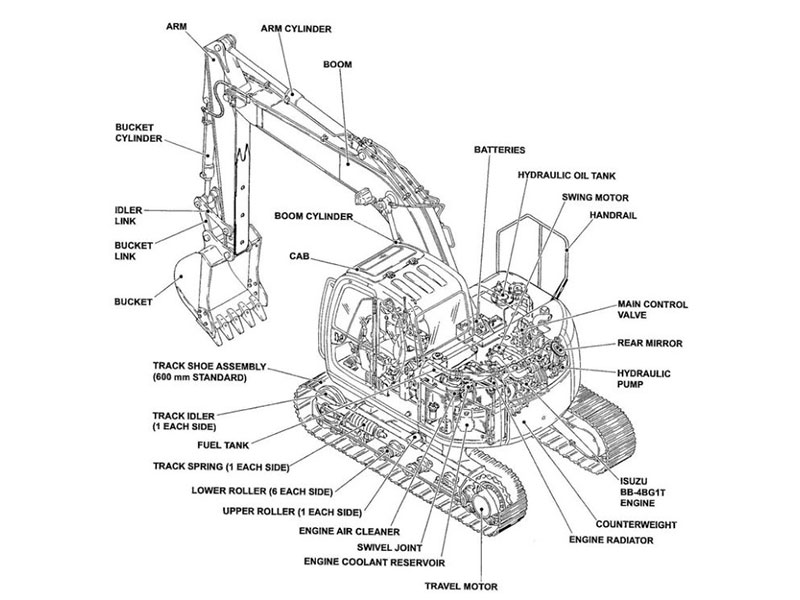
Open the volvo excavator parts catalog and find your machine section. Good parts diagrams show the component in its assembly context. You can see how it mounts and what surrounds it. Compare the shape, the mounting points, and the connections to your old part. Zoom in on the drawing. Small details, such as bolt patterns and port positions, separate similar parts. This visual check catches wrong guesses fast.
Locate the parts table associated with the correct figure, which may be elsewhere in the publication. Match the item reference, then read all relevant variant entries, ordering numbers, descriptions and notes. A drawing callout is not an ordering number.
Section names and arrangement vary. Use the publication contents and references to locate the relevant assembly and its parts table. Do not assume a printed manual and online catalog use identical layouts.
The relevant diagram confirms the component identity. It does not promise fitment. Diagrams show the general assembly. Your machine may carry options that change the picture. Use the drawing to confirm what the part is, then verify the part number against your serial number range. Compare the parts diagrams side by side when two components look alike. Cross-check the parts list entry with a second source when you can. A dealer can confirm the current number for your specific machine.
Keep your notes organized as you work. Write the old marking, the catalog item number, and the confirmed part number on one page. This record helps you order with confidence and helps any supplier serve you faster. Return to the volvo excavator parts catalog only after your notes are complete.
Note Configuration and Modifications
Your machine may not be built the standard way. Attachments, factory options, and aftermarket changes all affect which part is right. A thumb, a quick coupler, or a changed hydraulic circuit can change the part you need. Two machines with the same model badge can have different parts for this reason. Write down these details before you search the catalog.
Document Options and Changes
Walk around your machine and list every attachment and option you see. Note the boom and stick setup, the undercarriage type, and any auxiliary hydraulic lines. Write down aftermarket additions too. A repaired or replaced component may not follow the original build. State what is really on the machine, not what the manual says should be there.
Describe each change in plain words. “Welded bracket on the left side of the boom” tells a supplier more than “modified.” Copy any option codes from the machine plate if they show up there. Keep this list with your machine ID notes. The catalog may show option notes for different setups. Match your notes against those notes before you trust a listing.
Prepare Photos and Quantities
Take clear photos of the component and the area around it. Shoot from several angles. Include the mounting points and any nearby hoses or brackets. Good photos show a supplier what words cannot. Add a photo of any part marking you found. Keep the images sharp and well lit.
State the repair quantity you actually need and the basis used in the catalog, such as one assembly or one side. Confirm kit contents, assembly inclusions and any separately required items. Describe whether you need a service item, an individual component, a kit or an assembly.
Read the Volvo Excavator Parts Catalog and Verify Fit
Check Serial Ranges and Supersessions
The catalog puts parts into groups by serial number ranges. Find the range that covers your machine before you read any listing. A part listed for one range may not work for another. Option notes appear next to many listings. Read them closely. They tell you which build setups the item fits. Match those notes against the configuration details you wrote down earlier. This step connects serial ranges and configurations together.
Check current replacement information for any verified service number. A supersession can involve conditions or additional items, and may not apply to every variant. Do not treat an unidentified stamped marking as proof of a supersession.
Cross-Reference Part Numbers
Use applicable manufacturer documentation and a qualified parts contact to verify the selected entry and current replacement guidance. Two copies of the same old publication are not independent confirmation. Record the source and revision used, and resolve conflicting information before ordering.
Run a current supersession check before you commit. Confirm the replacement reference matches your serial number range. Ask the dealer to verify machine compatibility for your unit. A catalog listing alone does not promise fitment. Illustrations in parts diagrams show assembly context, not a service procedure. Use them to confirm identity, then let the dealer confirm the fit.
Record the applicable publication, selected ordering number and written applicability confirmation. Keep any limits or additional-item requirements with the request. This record helps reduce avoidable errors and supports later order checks.
A complete information pack gives the parts contact a stronger basis for verification. Include machine and component identity, configuration, markings, photographs, required quantities and the relevant catalog entry. Resolve remaining uncertainty before ordering.
Gather everything before you open a catalog. Write your notes down and keep your photos with them. When you feel unsure about compatibility, stop and check with a dealer. A quick check with the counter staff protects your order and your machine.
Keep the verified entry and written order details together for receiving and future reference.
FAQ
Why does the serial number matter more than the model name?
The model identifies a machine family; the complete machine identifier helps check applicable build records and serial coverage. Neither replaces confirmation of relevant options, replaced components and modifications. Record the full identifier and verify the selected entry with those details.
What should I do when my old part number does not appear in the catalog?
Keep the marking as a clue. It may be a casting or manufacturing identifier, an old service number, or something else. Ask a qualified parts contact to establish its meaning and verify any current replacement conditions before ordering.
Can a diagram alone confirm that a part will fit?
No. Diagrams show the component in its assembly context. They help you confirm identity, not fitment. Your machine may carry options that change the picture. Compare the drawing and parts list entry against your serial number range. Then let a dealer verify compatibility for your unit.
How many photos should I take before contacting a supplier?
Shoot the component from several angles. Include the mounting points, nearby hoses, and brackets. Add a clear photo of any part marking. Keep the images sharp and well lit. Good photos show what words cannot. They also cut back-and-forth with the counter staff.
Which catalog section should I search first?
Use the contents and assembly references to find the relevant system, then check that the drawing and associated parts table belong together. Section names vary across publications. Keep the publication identification, figure and selected entry in your notes.
For Volvo excavator parts sourcing, consider YNF Machinery. Provide full machine and component identification, applicable part numbers and quantities, and request supported compatibility information, an actual quotation and written warranty and return terms before ordering.