

Use a clear record to identify excavator undercarriage parts before ordering. Capture the machine details, component location, part markings, and relevant measurements, then compare them with the applicable parts documentation.
Record the make, full model, and serial number or PIN.
Identify each component by its proper name, position, and side.
Copy markings and part numbers exactly; use dimensions only when relevant.
Compare each record with the parts manual or catalog for the machine.
Identify the Machine and the Parts Reference
Start with the equipment identification. Record the make, complete model designation, and full serial number or PIN exactly as shown on the machine. Include all letters, suffixes, and digits. A shortened model name may not identify a specific production configuration.
Use the operator manual or parts catalog that applies to the machine. Check any serial range or configuration notes next to the parts listing. If a catalog shows a replaced or superseded number, confirm that the current reference applies to this machine before ordering. Do not use an example from another model as a fitment specification.
The location of the identification plate varies. Check the machine documentation for its location, then take a clear photo of the complete plate. Keep that image with the make, model, and serial number so the information can be reviewed together.
Recognize Components by Name and Position
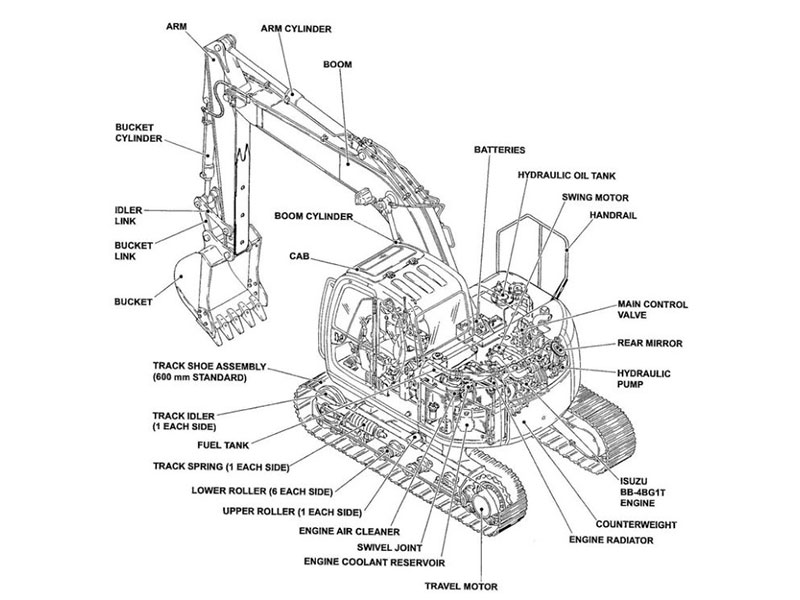
Use the names in the machine’s parts documentation when identifying components. Common tracked undercarriage assemblies include track chains, track shoes or pads, bottom rollers, carrier rollers, idlers, sprockets, and, where fitted, adjusters and guides. Not every machine has the same arrangement, so use the catalog diagram for the specific equipment.
Record where each component sits. Note the side of the machine and the location along the track frame, such as front or rear, upper or lower, or a position number shown in the manual. Use one consistent viewpoint when labeling left and right. Do not assume parts on both sides are identical; check the catalog for each position.
A diagram can help distinguish nearby components, but appearance alone does not prove that a replacement is correct. When a component is unclear, compare its position and mounting points with the machine-specific illustration before identifying it.
Inspect and Document Each Part
Clean away loose material only as permitted by the operator manual and safe work procedure. With the machine secured, make a visual record of the component, its mounting location, visible markings, and apparent condition. Follow the manufacturer’s safety instructions before working around or under equipment. Do not adjust track tension or remove components as part of this identification check unless the service procedure calls for it and the work is performed safely.
Copy stamped or cast numbers character for character, including dashes and letters. Note the component name, location, side, and quantity. Photograph the marking close enough to read, then take a wider photo that shows where the component is installed. Keep the photos paired with the written entry.
If a marking is missing or unreadable, do not guess. Use the parts catalog for the complete machine identification and the component’s location. If the installed part appears different from the illustration, record that difference and verify the machine’s configuration before choosing a replacement.
Record Relevant Measurements
Measurements can support identification when the parts documentation calls for them. They supplement the catalog and part number; they do not establish compatibility by themselves. Record only dimensions that apply to the component being checked and use the measurement method specified by the manual.
Depending on the part, relevant details may include track width, chain pitch or link count, shoe width, roller dimensions, mounting-hole spacing, or a component’s flange arrangement. These details are not universal specifications. Compare them with the applicable catalog entry and the removed component, taking care to use the same reference points.
Keep units and measurement notes with each value. If you cannot determine where or how a dimension should be measured, leave it unconfirmed and consult the service documentation. A precise record should make clear which details came from the manual, which came from a part marking, and which were measured in the field.
Build a Parts Record and Verify Before Ordering
A simple record can include:
Machine make, full model, and serial number or PIN
Catalog or parts-manual reference and applicable serial range
Component name, location, side, and quantity
Part number and visible markings
Relevant dimensions, with units and measurement notes
Photo references and any observed differences
Review the record against the parts catalog one component at a time. Confirm that the model, serial range, location, and part number all correspond. If the catalog lists multiple versions, check the notes rather than selecting the first similar-looking item. If information is incomplete or inconsistent, pause and ask a generic parts supplier to verify the catalog entry against the complete machine details.
Before placing an order, confirm that any proposed replacement number is documented for the machine and serial range. Mention prior modifications if known, since the installed configuration may differ from the original build. Save the completed record so the same identification can be checked during future service.
FAQ
What details should I record before ordering undercarriage parts?
Record the machine make, full model, and serial number or PIN. For each component, note its name, position, side, part number or marking, quantity, applicable dimensions, and photo reference.
Can I identify a replacement by appearance alone?
No. Similar-looking components may differ in dimensions or mounting details. Use the machine-specific parts catalog and verify the component location and part number.
What if the old part has no readable number?
Use the parts catalog entry for the complete model and serial number or PIN. Record the component location and compare the catalog illustration. If the configuration remains unclear, request a fitment confirmation using the machine details.
Should I record measurements for every component?
Only record dimensions that apply and that you can measure using the method in the relevant documentation. Measurements support the parts reference; they do not replace it.
Conclusion
Identify the machine, use the applicable parts reference, and record each component’s name, position, markings, and relevant dimensions. Check the completed record against the model and serial range before ordering. For a fitment review, contact YNF Machinery with your machine details.